JANUARY 23, 2013
Releasing Whatismyzip.com

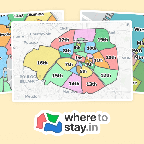
Every now and then, I find myself in need to know the ZIP code for the location where I'm at. Usually this is when I'm at the office, visiting my parents, or similar, and I'm about to order something.
I realized that combining HTML5's GeoLocation API with the Google Maps API, I could build a small website to solve this problem.
The result of this is called What is my zip? (use a smartphone or other device with GPS for best result).
All the functionality was built in one hour on a train between Stockholm and Uppsala, and then I spent a couple of hours designing it. Beeing a small hack, I'm quite pleased with the result :).
See it in action, go find out your zip code
(works best on a smartphone)
DECEMBER 06, 2012
Heroku: Running multiple python processes in a single dyno using foreman
Recently I've made a few small python web projects that I've deployed on Heroku. For some of these projects I've needed to run asynchronous jobs through Celery.
Heroku allows you to run one free dyno (or actually they give you 720 free dyno hours per month, which corresponds to one dyno constantly running). This means that if you choose to run one web dyno and one worker dyno (celery in this case), you'll be charged for 720 dyno hours. However, if you have a very small project, or your're working on a project that hasn't been released yet, you can avoid this cost.
A heroku dyno is like a process, and in this process you can actually spawn new processes, as long as you stay within the limit of 512 mb ram (the process also only has one CPU core). Heroku suggests that you use foreman when you run your application on your local machine, but you can actually use foreman on heroku, in order to run multiple processes in a single dyno.
Instructions
1. The first thing we'll do is to create a post_compile script in the bin directory of our project. In this script we'll add a few lines that will install foreman and make it available in our project slug. Create the file PROJECT_ROOT/bin/post_compile with the following content:
#!/usr/bin/env bash
# set terminal to UTF8 (otherwise `gem install foreman` fails)
export LANG=en_CA.UTF-8
# set up ruby env
mkdir .ruby-gems
export GEM_HOME=$PWD/.ruby-gems
export PATH=$PATH:$PWD/.ruby-gems/bin
# install foreman
gem install foreman
2. Next, we'll create a new procfile, in the project root directory, which we'll call ProcfileFree:
web: gunicorn -b 0.0.0.0:$PORT -w 4 myapp.wsgi:application
celery: python manage.py celeryd -c 3 --beat
3. The third thing to do is to update the "real" Procfile that Heroku uses, so that it starts foreman with our new ProcfileFree. The content of my Procfile is:
web: env > .env; env GEM_HOME=$HOME/.ruby-gems env PATH=PATH:$HOME/.ruby-gems/bin foreman start -f ProcfileFree
And that's all! After deploying the above, and scaling the web dyno to 1, Heroku will start foreman which will start the processes that you've defined in ProcfileFree (in my example this was gunicorn and celery through Django's manage.py).
Please note
This method can be very useful for small projects sometimes, but it will not be performant. If you get more traffic than it can handle, scaling dynos the normal way is definitely the way to go.
Also note that when you're only running a single dyno, Heroku will stop it if it hasn't received any web requests in a while. One possible way to get around this is to ping your website with http requests regularly.
Lastly, I just want to say that I think Heroku is a great service, and I don't mind paying for it at all, which I do for a few larger projects that I host there.
JULY 05, 2011
Extending templates from a specific Django app
A while ago (well, actually a long time ago since I had this blog post laying around as a draft, until I stumbled across a stack overflow question that this post would answer) I wanted to customize Django's admin app, by adding a link to a statistics page that I had built, on the index.html page of the admin app.
I could have copied the index.html from the templates directory in the admin app, to my project's templates directory and added my link, but this would have given me a maintenance task to keep Django's admin templates up to date in future versions. So what I really wanted to do was to define my own admin/index.html file in the project's templates directory, and then in my index template extend the index template from the admin app. However this isn't supported by Django be default.
When I searched the web I found all sort of solutions to the problem, some involving symlinking the admin's index.html to another path and then extending the symlink, but that wasn't an option for me since I develop on both Windows and Unix, and besides, it didn't feel like a very clean solution.
Finally I found very nice template loader on djangosnippets.org which solved my problem! It allows you to extend a template from a specific Django app by using the following syntax:
{% extends "admin:admin/index.html" %}
As you can see, I specify the app where the template resides before the colon. The admin/index.html, in my project's template directory, that I finally ended up with looks like this:
{% extends "admin:admin/index.html" %}
{% block sidebar %}
{{block.super}}
<div>
< h1>Statistics< /h1>
< a href="/admin/station/stats/">Published Stations< /a>
</div>
{% endblock %}
Now I won't have to change anything if the Django admin app's index.html is updated in a newer version of Django, unless the sidebar block is removed, or something similar.
Also, if you decide to use this trick, don't forget to add the template loader to the TEMPLATE_LOADERS list in your project's settings.py file.
OCTOBER 07, 2010
Google Chrome bug when setting document.title after tab switching
Usually it's IE6 that makes you cry because of quirky behavior, but today I ran into a bug in Chrome. It caused notification messages to sometimes get stuck in the title bar, in my Title Alert jQuery plugin.
It turns out that if you set document.title immediately after you have activated the browser tab (for example in the window.onfocus event handler), the title change will not be visible in the tab bar or task bar.
One can easily reproduce this by opening any web page in Chrome, bringing down the JavaScript console, and entering the following code:
window.onfocus = function(){document.title = "hello world";};
When switching to another tab and back again after this code has been executed, the text in the tab bar and task bar doesn't change, but using the JavaScript console you can see that the document.title has in fact changed.
The bug does not appear if you, instead of switching between tabs, switches to another application and back again.
New version of Title Alert
I've released a new version (0.7) of my jQuery plugin Title Alert that includes a workaround for this problem. It also contains a new option parameter (stopOnMouseMove) and an IE6 fix.
Download it here or visit the GitHub page.
SEPTEMBER 30, 2010
jQuery Title Alert
A little more than a year ago I wrote a small jQuery plugin at ESN where I work, called jquery-titlealert. It provides functionality for flashing a notification message in the browser title.
Title alert notifications can be useful when you want to notify a user of some kind of web page event (for example an incoming chat message), when the user has another window, or another browser tab, in focus. Especially if your site uses real-time functionality, like contact lists, user chats, etc. Which, BTW, can easily be achieved using Beacon Push, which is a real-time website service we run at ESN.
Get it
Download v0.7 here. The source code is hosted at GitHub.
Last update: 2010-10-07
How to use it
First, include it on the web page (make sure jQuery has been previously included on that page):
<script type="text/javascript" src="jquery.titlealert.js"></script>
Then you will be able to flash a notification message in the browser title by running:
$.titleAlert("New chat message!");
Or with some options:
$.titleAlert("New chat message!", {
requireBlur:false,
stopOnFocus:false,
duration:4000,
interval:700
});
The plugin provides options for setting different timings and intervals, as well as functionality for stopping the message flashing when browser window gets focused. See below for all details.
API
$.titleAlert(message, options);
| message | A string the message that should be flashed in the browser title. |
| options | JavaScript object containing options |
Options
Here are the available options that can be set in the option object.
| name | default | description |
|---|---|---|
| interval | 500 | The flashing interval in milliseconds. |
| originalTitleInterval | null | Time in milliseconds that the original title is diplayed for. If null the time is the same as interval. |
| duration | 0 | The total lenght of the flashing before it is automatically stopped. Zero means infinite. |
| stopOnFocus | true | If true, the flashing will stop when the window gets focus. |
| stopOnMouseMove | false | If true, the flashing will stop when the document recieves a mousemove event (i.e. when the user moves the mouse over the document area, regardless of what window is active). |
| requireBlur | false | Experimental. If true, the call will be ignored unless the window is out of focus. Known issues: Firefox doesn't recognize tab switching as blur, and there are some minor IE problems as well. |
Compatibility
Title Alert works with jQuery 1.3 and 1.4. It's tested in Firefox, Chrome, Internet Explorer >= 6 and Safari.
JUNE 18, 2010
URL Shorteners Suck
Ever since the rise of twitter, when URL shortening services got an extremely big popularity boost because twitter chose to shorten their URLs for technical reasons while ignoring user experience, the web has been polluted with shortened links.
- I want to be able to see where a link goes before I click it.
- I want to be sure that my links continue to work indefinitely.
- I don't want random companies to track my internet usage.
URL shortening services interferes with all of my above statements. So please. Do. Not. Use. Them.
Let's just hope that the upcoming release of annotations for tweets functionality could help decrease the use of these horrible services.
How ever, there is a GreaseMonkey script that I've been using, called TinyURL Decoder, that changes URL shortened links into the real URL that they point to. It just solves one of the problems with URL shortening, but at least you can see where the links go.
APRIL 22, 2010
Python urllib2 timeout issue
I use urllib2 from Python's standard library, in quite a few projects. It's quite nice, but the documentation isn't very comprehensive and it always makes me feel like I'm programming Java once I want to do something more complicated than just open an URL and read the response (i.e. handling redirect responses, reading response headers, etc).
Anyway, the other day I found - if not a bug - then at least an undocumented issue. Since Python 2.6, urllib2 provides a way to set the timeout time, like in the following code where the timeout is set to 2.5 seconds:
import urllib2
try:
response = urllib2.urlopen("http://google.com", None, 2.5)
except URLError, e:
print "Oops, timed out?"
If no timeout is specified, the global socket timeout value will be used, which by default is infinite.
The above code will catch almost every timeout, but the problem is that you might still get a timeout raised as a totally different exception:
File "/usr/lib/python2.4/socket.py", line 285, in read
data = self._sock.recv(recv_size)
File "/usr/lib/python2.4/httplib.py", line 460, in read
return self._read_chunked(amt)
File "/usr/lib/python2.4/httplib.py", line 495, in _read_chunked
line = self.fp.readline()
File "/usr/lib/python2.4/socket.py", line 325, in readline
data = recv(1)
socket.timeout: timed out
The solution is to catch this other exception, thrown by python's socket lib, as well:
import urllib2
import socket
try:
response = urllib2.urlopen("http://google.com", None, 2.5)
except URLError, e:
print "Oops, timed out?"
except socket.timeout:
print "Timed out!"
Hopefully this will save someone else some headache :).
MARCH 17, 2010
Hack your motivation with statistics
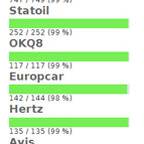
For a website me and my friend Robert recently released we had to do a tedious work of manually positioning a lot of car rental stations geographically on a Google Maps widget. For every station, we had to look up the address using a swedish yellow pages service or Google it if it wasn't found, and then manually verifying that there was a car rental station at the address (by looking at the satellite image, or Googling).

Just for the fun of it, I created a statistics page where - for each rental company - you could see how many of the stations had been positioned and how many had not, as well as some progress bars. It wasn't until after I had done it, and we had done some positioning, that I realized what genius move it was! The extremely boring work of positioning, what seemed to be an endless stack of car rental stations, suddenly didn't seem that endless. Every ten minutes I could check and see that the progress bar had moved another %. This made me go on doing more stations each positioning session, as well as increase the frequency of the sessions. I frequently checked in to see if my friend had positioned any stations, which often led to me doing one or two percent.
It took me 15 minutes to implement, and it was probably one of my best invested 15 minutes ever. So, I guess what you can learn from this, is that just like blizzard "hacks" your motivation in World of Warcraft by continuously letting you see character improvement and giving you small rewards, you yourself can trick yourself into feeling more motivated for some boring task by making it possible to easily access information about the progress.
MARCH 03, 2010
Favorite Django Tips
A few months ago I found a really useful Stack Overflow Question. Here are my favorites from the answers.
Use render_to decorator instead of render_to_response
This decorator is found in the app django annoying, and is a very nice shortcut for declaring what template a view should render.
Instead of returning the response of render_to_response, you just return a python dict which will be used as the template context for the template specified as argument to the @render_to decorator. If anything else than a dict is returned, normal view processing will occur, so this won't break redirects or any other cases where you might return a HttpResponse (for example normal render_to_response code).
Anyway, here is an example on how to use it:
@render_to("list.html")
def list_posts(request):
posts = BlogPost.objects.all()
return {"blog_posts": posts}
This equals to:
def list_posts(request):
posts = BlogPost.objects.all()
return render_to_response('list.html',
{'blog_posts': posts},
context_instance=RequestContext(request))
Update (22/4): Marcin Nowak notified me that the render_to decorator breaks Django Reusable App converions, so I made a fork of django-annoying where I modified the render_to decorator to support template_name and extra_context keyword arguments.
Load custom template tags in all templates
Custom template tags that you use all over your templates can be auto loaded. Just add the following in a module that is loaded (i.e. your urlconf if you want the template tags to be loaded for the whole project)
from django import template
template.add_to_builtins('project.app.templatetags.custom_tag_module')
Use relative paths in settings.py
I hesitated about adding this tips, since I think it's quite obvious, but since so many people on Stack Overflow has voted it up, I guess there are people who use(d) absolute paths in their settings.py.
Don't use absolute paths in settings.py (i.e /home/jonatan/...), instead use relative paths so that the project will work wherever it resides.
import os.path
TEMPLATE_DIRS = (
os.path.join(os.path.dirname(__file__), "templates"),
)
JANUARY 08, 2010
MMS Decoder 0.82, and website back online
During the holiday I finally got to finish the re-make of my website, and I'm very happy to announce that it is now up and running on Python/Django. The biggest change here is that I've added a blog where I will write programming/web development/python/django/javascript/tech stuff. How ever, I predict that I will not write blog posts very often, but hopefully when I do, they will be interesting.
Powering this blog is a slightly modified version of Nathan Borror's Django Basic Apps. I'm planning to release my modified version (nothing fancy, just some small personal preference changes) as a GitHub fork when I get time.
New version of MMS Decoder (0.82)
I've released a new version of MMS Decoder that fixes a bug with decoding MMS messages encoded by an iPhone, as well as some other bugfixes and improvements.
Here are a few selected entries from the commit log:
- Fixed correct decoding of From-value.
- Changed default type of the part database column, in the example application, from blob to mediumblob.
- Adding different MMS PDUs I've collected during the years. Very useful for debugging.
MMS Decoder on GitHub
I'm also quite happy to announce that I have now created a GitHub project for my MMS Decoder. This way it will be much easier for people to make patches, and for me to incorporate them in the code, by forking me. So go ahead and fork me on: http://github.com/heyman/mms-decoder. (Or just follow me if you want to know when a new version is released).
If you just want to pull the GIT repository here is the URL:
git://github.com/heyman/mms-decoder.git
ABOUT ME
My name is Jonatan Heyman, and I'm a programmer. On this blog I write about programming, the web and technology.
I also listen to a large number of indie pop tunes. You can read more about me on the about page.